Choose a Planning Path
这部分内容暂未提供中文版本。
Use this page to decide how much planning a change needs. The answer turns on
one question: is the intent already well defined? If it is, feed it to
bmad-spec, which shapes it to the size of the work, and build. If it is not,
the other pages in this chapter are how you get a defined intent. If the work
belongs to an organization, with a PRD other people must approve and several
engineers building in parallel, read
Plan Inside an Organization first; it
says how this chapter fits the process you already have.
Start from the Intent
Section titled “Start from the Intent”A well-defined intent says what should be true when the work is done, what must not change, and what is out of scope: complete enough that someone else could build it without guessing, and no longer than that. Where it came from does not matter: a sentence, an issue, a forged idea, a research report, a PRD.
Keep the input short. bmad-spec reads everything you give it in one pass,
and the practical ceiling is a few tens of thousands of tokens, roughly a
40-page document. Hand it a pile of raw documents several times that size and
it silently loses the parts that mattered; condense them first. If the spec
says the input is too thin, you are not done on this chapter yet.
- Well-defined intent: run
bmad-specwith it. A spec that fits one Build session goes straight tobmad-build; an epic-sized one gets Story Breakdown and a Build per story. See Define Requirements and a Specification. - Anything else: the intent is not ready yet. Use the pages below until it
is, then run
bmad-spec. The spec skill writes the contract; it does not help you figure out what you want.
If the change fits one implementation session, you are on the Build page’s territory, not this chapter’s: Build a Change covers sizing a session and whether a small change needs BMad at all.
Get to a Well-Defined Intent
Section titled “Get to a Well-Defined Intent”These are independent tools, not stages. Pick the ones the gap calls for, in
any order. None of them build anything. Condense what they produce and hand
bmad-spec the result, not the raw pile.
| The intent is missing | Do this |
|---|---|
| A clear idea at all, or confidence the idea is good | Explore and Validate an Idea |
| Evidence a decision should rest on | Research a Decision |
| A written account of what the product is, for a PRD or a pitch | A brief or PRFAQ: Define Requirements and a Specification |
| Shared decisions several epics or agents must follow | Design UX and Architecture |
| Agreement, ownership, and sign-off among several people or teams | A PRD as the document the organization owns: Plan Inside an Organization |
A short list of decisions is often enough on its own. You need a PRD when more
than one person must agree on what the product is, or more than one epic must
not diverge; otherwise skip it. A multi-epic product runs bmad-spec once per
epic with those documents as sources.
Size Follows the Intent
Section titled “Size Follows the Intent”The size of the intent decides how many Build sessions follow. One coherent outcome that needs several sessions is an epic. Work that spans several epics, or likely needs roughly 20 or more sessions, is a project. Scope is only one signal: use more planning when the work has high risk, unclear requirements, broad architectural reach, cross-system effects, or coordination between people or teams.
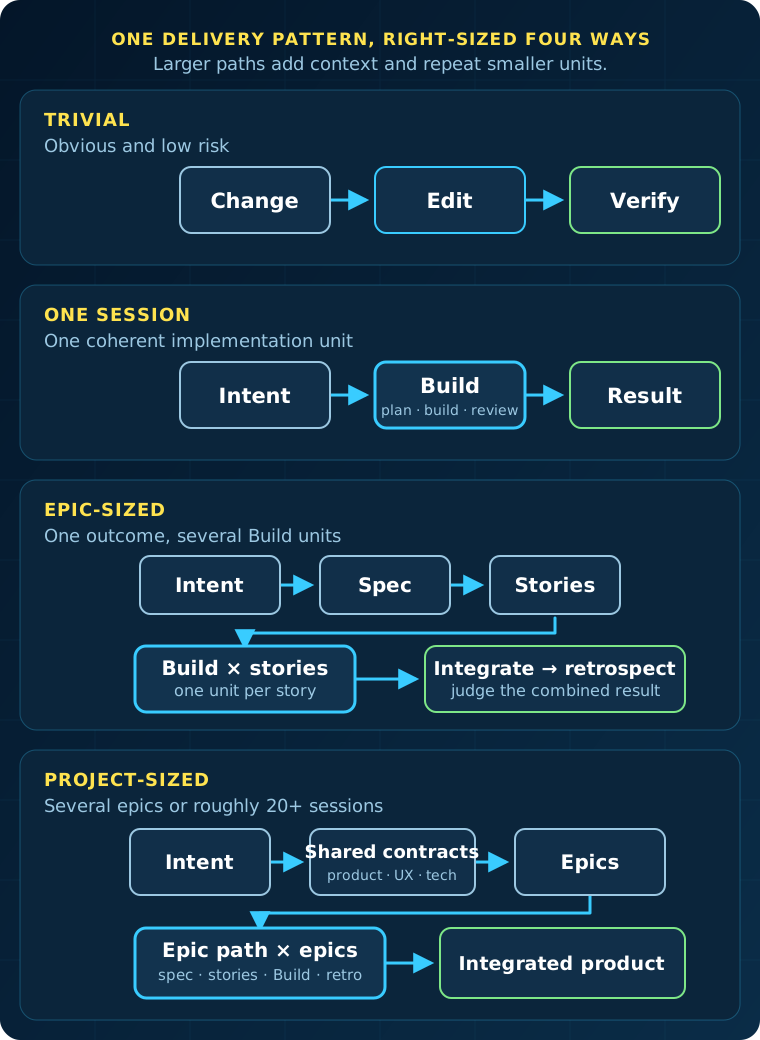
Every path uses the same implementation unit. Larger work adds shared context around that unit and repeats it; it does not switch to a separate delivery system.
Run the Path
Section titled “Run the Path”1. Start Epic-Sized Work
Section titled “1. Start Epic-Sized Work”Use this path when the work needs several Build sessions but still has one coherent outcome.
Define and divide the epic
- Run
bmad-specwith the epic intent. See Define Requirements and a Specification for what a spec contains and when it is enough on its own. - Ask for Story Breakdown. This creates the ordered
stories.yamlbesideSPEC.md. - Review the proposed order and decide which stories need a checkpoint.
The story list is an execution plan, not a promise that nothing will change. Update the spec and re-run Story Breakdown when earlier work reveals a missing constraint, a better division, or a conflict between stories.
Establish the implementation pattern
Implement important, risky, or foundational stories with bmad-build. Early
stories often settle the architecture, initial project structure, and repeated
patterns that later stories will follow. Give those decisions human attention
before automating repetitions of them.
Run Build once per story. Build creates or resumes that story’s implementation record under the spec folder and keeps it linked to the parent spec.
Finish the epic
Verify the stories together, not only one at a time. Then run
bmad-retrospective with the spec folder. Retrospective reads stories.yaml
as the epic inventory and judges the combined result against the parent spec.
See Finish an Epic.
2. Start Project-Sized Work
Section titled “2. Start Project-Sized Work”Use the full BMad flow for a greenfield product, a multi-epic initiative, or work likely to need roughly 20 or more implementation sessions.
Prepare only the planning the project actually needs from the table above
(Plan Inside an Organization covers who
owns which document and where sign-off happens). Then run bmad-spec per epic,
track the stories with
Break Work into Stories and Track It,
and close each epic with Finish an Epic.
These documents coordinate implementation. They do not replace Build. Each epic still becomes a sequence of one-session units. Independent epic streams can proceed in parallel when their boundaries are explicit. Each stream needs an owner, and all streams stay accountable to the same product intent and architecture. Run integration checks and a retrospective at each epic boundary.
Dividing work can lose information: a requirement weakens, a constraint disappears, or two correct stories fail when combined. The PRD, architecture, and specs exist so later sessions can still see the whole.
After Decisions Stabilize
Section titled “After Decisions Stabilize”bmad-build-auto runs one session without waiting for human input. It does
not choose the next story or own the backlog. Use it after the important
implementation decisions are stable. For the worker contract, see
Autonomous Development Loops.
What You Get
Section titled “What You Get”A path sized to the work: a spec and stories for an epic, or shared product documents plus one spec per epic for a project — each still implemented one Build session at a time.