Choose a Development Path
Tento obsah zatím není dostupný ve vašem jazyce.
Use this guide to choose the smallest amount of BMad that safely fits your software change.
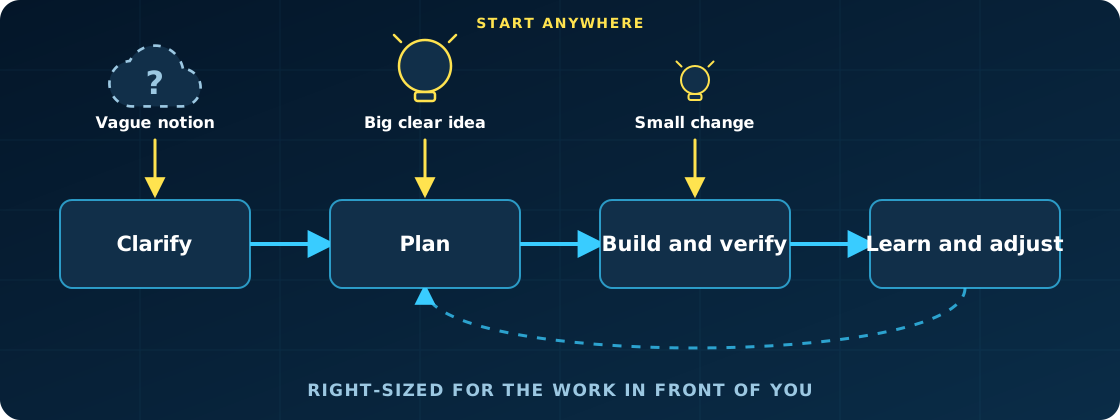
Every path uses the same delivery loop. Larger work adds shared context around the loop and repeats its implementation unit; it does not switch to a separate delivery system.
When to Use This
Section titled “When to Use This”- Before starting a change when you are unsure how much planning it needs
- When one request has grown beyond a single implementation session
- When deciding which stories need your attention and which can run unattended
- When coordinating several epics without losing the shared product intent
Choose the Path
Section titled “Choose the Path”1. Find the Smallest Safe Unit
Section titled “1. Find the Smallest Safe Unit”Start with the intent, not a preferred workflow. Ask whether one implementation session can reasonably understand, implement, review, and finish the change.
Scope is only one signal. Use more planning when the work has high risk, unclear requirements, broad architectural reach, cross-system effects, or coordination between people or teams.
The session counts below are guidelines, not requirements. A small security change may need more structure than a much larger routine update.
2. Choose a Path
Section titled “2. Choose a Path”| Path | Use it when | Start with |
|---|---|---|
| Trivial work | The edit is obvious, low-risk, and does not benefit from structured review | Make the edit directly |
| One-session work | One coherent intent fits an implementation session | bmad-build |
| Epic-sized work | One coherent outcome needs several implementation sessions | bmad-spec, then Story Breakdown |
| Project-sized work | The work spans several epics or likely needs roughly 20 or more implementation sessions | The full BMad flow |
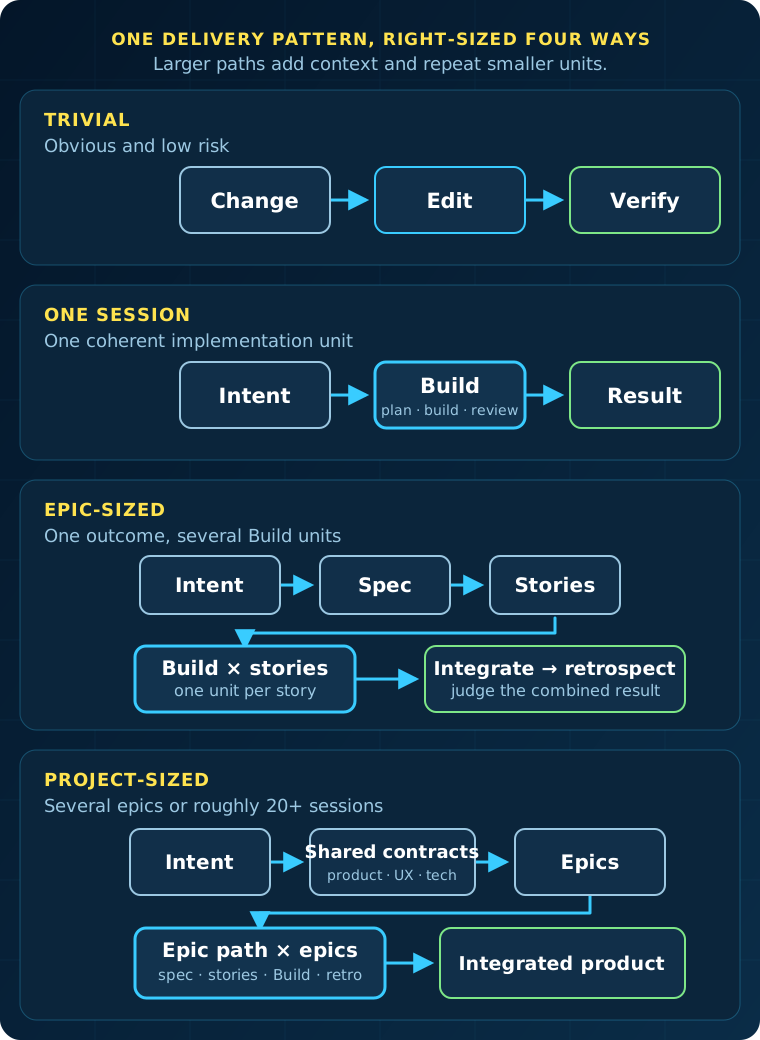
If a tiny change would benefit from explicit planning and review, use
bmad-build even though you could edit it directly.
Run the Path
Section titled “Run the Path”3. Start Trivial or One-Session Work
Section titled “3. Start Trivial or One-Session Work”For trivial work, make the change with your normal development tools. Do not add workflow steps that provide no useful safety or clarity.
For one-session work, invoke Build directly with the outcome you want:
/bmad-build Add JSON output to the diffsettings command without changing itsexisting formats.Build accepts direct intent, an issue, an intent file, an existing Build spec, or a planned story. It clarifies the unit, plans when needed, implements it, reviews the result, and records what happened. See Build a Change for the implementation model.
4. Start Epic-Sized Work
Section titled “4. Start Epic-Sized Work”Use the lightweight epic path when the work needs several Build sessions but still has one coherent outcome.
Define and divide the epic
- Run
bmad-specwith the epic intent. - Ask for Story Breakdown. This creates the ordered
stories.yamlbesideSPEC.md. - Review the proposed order and decide which stories need checkpoints.
The story list is an execution plan, not a promise that nothing will change. Update the spec and re-run Story Breakdown when earlier work reveals a missing constraint, a better division, or a conflict between stories.
Establish the implementation pattern
Implement important, risky, or foundational stories with bmad-build. Early
stories often settle the architecture, initial project structure, and repeated
patterns that later stories will follow. Give those decisions human attention
before automating repetitions of them.
Run Build once per story. Build creates or resumes that story’s implementation record under the spec folder and keeps it linked to the parent spec.
Finish the epic
Verify the stories together, not only one at a time. Then run
bmad-retrospective with the spec folder. Retrospective reads stories.yaml
as the epic inventory and judges the combined result against the parent spec.
5. Start Project-Sized Work
Section titled “5. Start Project-Sized Work”Use the full BMad flow for a greenfield product, a multi-epic initiative, or work likely to need roughly 20 or more implementation sessions.
Prepare the planning that the project actually needs: discovery, product requirements, UX, architecture, epics, readiness, and sprint planning. These artifacts create shared contracts and coordination around implementation. They do not replace Build. Each epic still becomes a sequence of session-sized units.
Independent epic streams can proceed in parallel when their dependencies and integration boundaries are explicit. Each stream needs an owner, and all streams remain accountable to the same product intent and architecture. Run integration checks and a retrospective at each epic boundary.
Operate Larger Paths
Section titled “Operate Larger Paths”6. Add Automation After Decisions Stabilize
Section titled “6. Add Automation After Decisions Stabilize”bmad-build-auto runs one session-sized unit without waiting for human input.
It does not choose the next story or own the backlog.
Use it after the important implementation decisions are stable. An AI coding
session can act as the orchestrator, dispatch one Build Auto worker per story,
and revise later work when new evidence appears. The optional
bmad-loop orchestrator can run an
ordered stories.yaml deterministically.
bmad-loop follows list order. It does not infer a dependency graph or provide project-level parallel coordination. For the worker contract, story selection, and status records, see Autonomous Development Loops.
7. Protect the Larger Intent
Section titled “7. Protect the Larger Intent”Dividing work can lose information. A requirement may weaken, a constraint may disappear, or two correct stories may fail when combined. Larger BMad paths add controls for those risks:
- Product, UX, architecture, and epic artifacts preserve shared decisions.
- Every implementation unit remains traceable to its parent contract.
- Story records carry implementation decisions and completion state forward.
- Later units can incorporate evidence from earlier work.
- Integration checks judge the combined behavior.
- New evidence can update later units or the parent plan.
- Retrospectives judge the whole epic and feed lessons into later work.
Planning therefore continues during implementation. The sequence of units can evolve as long as changes are reconciled with the parent intent.
What You Get
Section titled “What You Get”You get a development path sized to the work: direct editing for the safest trivial changes, one attentive Build run for a session-sized unit, a shared spec and story records for an epic, or full project contracts and coordination for several epics.